
Rung 6: a dedicated firewall
A dedicated firewall, the kind small businesses use, guards the edge of your network, with rules you can read, back up and check. The router from rung 5 becomes your wifi access point behind it. It is the step for a household or small office that wants the network itself to be as trustworthy as the boxes on it.
Status. Built and tested on the bench on 20260929. The tests included a 10 s power cut with the firewall in the path, after which the internet answered from the LAN in 44 s. Still to come: a day of the site’s checks through the new edge. The bench keeps double NAT (two routers in a row that each translate addresses, rung 5 ), so the firewall’s upstream is itself a private network.
What you get #
- A firewall at the edge in place of the rung 5 router: routing, DHCP, the rules between networks, and its configuration exported to the repository every day, with an alert when the two differ.
- The rung 5 router as a plain wifi access point behind the firewall: no DHCP, no DNS, no routing and no firewall of its own. It still carries the main, guest and IoT networks, and its rung 5 configuration stays in the repository as the way back.
- Guest and IoT networks without a managed switch. The access point hands each wifi network to the firewall on its own VLAN over one cable, so an ordinary unmanaged switch is enough.
Buy. An N100 mini PC with two or more network ports running OPNsense (about $240; the bench used its spare, a Chuwi LarkBox X with a 1 GbE and a 2.5 GbE port), or a purpose-built firewall appliance ($890). Put it on the UPS.
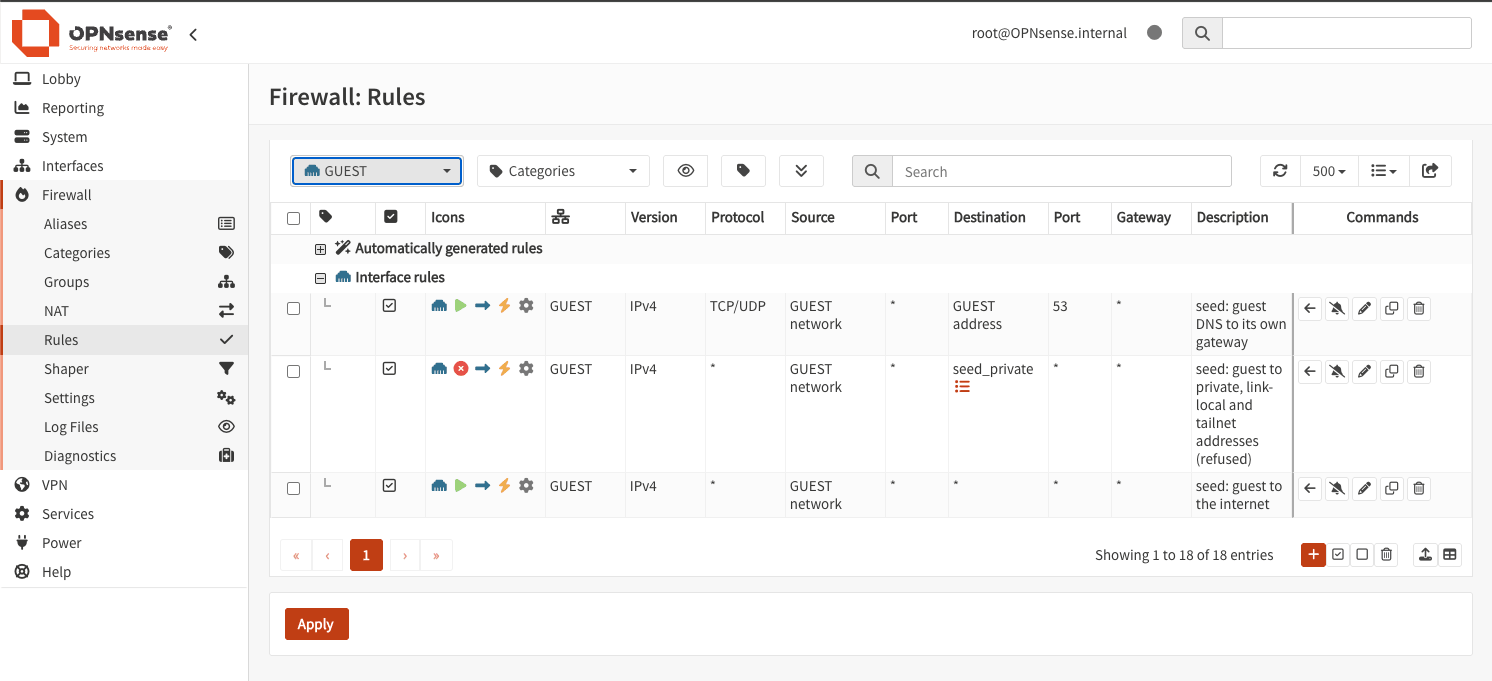
What still fails. The switch, the UPS and the infra box are still single, and the firewall is now on every path in and out. The access point keeps its rung 5 configuration in the repository, so putting the router back at the edge is one command and two cables.
Decisions and options #
A firewall and a separate access point. From this rung on, the edge is two boxes. OPNsense runs on FreeBSD, whose wifi drivers lag Linux’s. Modern cards can join a network there but not serve one, so OPNsense makes a poor access point, and its own guidance is to use a dedicated one. Placement agrees. The firewall belongs with the other boxes and the UPS, and the access point belongs where the wifi is used. A dumb access point is cheap to move, replace or add to on the same VLANs, without touching the firewall. A site that needs no separate firewall keeps rung 5’s one router.
The access point is dumb, and proven dumb. An access point that keeps a DHCP server or a resolver running becomes a hidden second one. The router’s DHCP, DNS and firewall services are off. The wifi test on 20260929 joined each network and found DHCP and DNS answering only from the firewall (69 of 69 checks).
The VLANs ride one cable; the switch never sees a tag. The bench’s unmanaged switch dropped tagged frames when tested before the change, as some cheap switches do. So the firewall’s LAN port runs straight to the access point. That one cable carries the main LAN untagged, and guest (VLAN 20) and IoT (VLAN 30) tagged. The switch hangs off the access point’s other port, where it sees only the untagged main LAN:
upstream ── firewall ── access point ── switch ── every box
            (main LAN untagged,         (main LAN only)
             VLANs 20 and 30 tagged)
The cost. Everything on the switch passes through the access point’s bridge and its 1 GbE switch port. The measurements below show the access point carries that. Would change it. A managed switch that keeps tags lets the access point hang off the switch instead.
| network | VLAN | subnet | may reach | may not reach |
|---|---|---|---|---|
| main LAN | none | 192.168.1.0/24 | everything, including the site’s services by name | nothing extra |
| guest | 20 | 192.168.20.0/24 | the internet; DHCP and DNS at its own gateway | the LAN, the firewall’s own services, IoT, the tailnet (the site’s remote-access network) |
| IoT | 30 | 192.168.30.0/24 | the internet; the main LAN may open connections in | the same as guest; it opens none back |
The tag equals the subnet’s third octet, so a reader can tell them apart at a glance.
Guest and IoT get DNS that knows no site names. A resolver on the firewall answers only on the guest and IoT gateways and forwards over encrypted DNS. The main LAN keeps rung 5’s Technitium servers.
DHCP writes names into DNS. The firewall’s DHCP server (Kea) registers each main-LAN lease
in the lan. subzone with a signing key. Technitium limits that key to the subzone, to the A
and DHCID records a lease writes, and to the firewall’s address. We revoked the router’s old
token.
Two ports, and the driver to watch. The 1 GbE port (Realtek RTL8168h) faces the upstream,
since it has the oldest, best-supported driver and sits on the side that is hardest to reach
when something fails. The 2.5 GbE port (Realtek RTL8125B) faces the LAN. FreeBSD 15.1 in OPNsense
26.7 has no native driver for it, so it runs on Realtek’s own driver from the os-realtek-re
plugin. Install the plugin before assigning the LAN. After every OPNsense upgrade, confirm the
plugin is still installed and the LAN port still passes traffic.
Install at the console, with a fixed upstream address. The firewall installs from a USB stick at its keyboard, with firmware set to power on after AC loss and the clock in UTC. The upstream side (the WAN) is static, because some network chips drop outgoing DHCP. With the upstream itself on a private network, as behind double NAT, turn off “Block private networks” on the WAN, or the firewall refuses anything that starts from the upstream network, such as a remote-access path through it.
The configuration in the repository. Every day the firewall exports its configuration, with password hashes, keys and the upstream’s values removed on the box. The site’s monitoring pulls the export with a key that can run only that export. An alert fires when it differs from the repository’s copy. Proof. On 20260929 we changed the configuration on purpose, and the alert fired about 45 s after the export updated.
Local names stay off the firewall. The site’s DNS servers stay on the core box (rung 3 ) and the infra box (rung 1 ), so a firewall outage takes away the internet but not the LAN’s own names. That is by design and not yet tested, because the power cut below did not check names. infra runs Unraid, and its DNS secondary is a container there. Unraid cannot reach its own container on a macvlan network until Docker’s “Host access to custom networks” is on, so turn it on; infra then resolves through its own secondary first and core’s primary second. A one-second resolver timeout keeps a lookup from stalling when one server is down. With the secondary stopped on 20260929, lookups on infra took about 1 s, against 3 to 5 s before.
The change itself, and what it taught #
An agent must not depend on the path it is changing. The building agent needs the internet to think, and the cut-over removes the internet. The bench ran the change as one script on the agent box that needs no internet, with its own timed rollbacks and a way back that runs by itself, and told Christoph when to move each cable.
It took four windows. The first three failed safe, each on a defect that only shows live. In the
first, a background reload never started, because the router’s shell lacks nohup. In the
second, a check pinged the upstream’s gateway, which the upstream blocks by design. In the
third, a cable was moved before the script asked, while it was confirming the firewall’s move.
The script took the site back to rung 5 twice on its own. The third time it stopped before its
last step, rather than risk two gateways, and we restored the router by hand. Before each next
window we rehearsed the fix on the bench without an outage. The fourth window cut the site
over, with the internet down for about three minutes.
The recommendation from it. Keep the building agent connected through the window, with a second internet connection or a local model it can fall back on, and let it drive the change interactively with the script as its tool. Keep a fully unattended script as the fallback, because every failure above needed thinking in the moment. Once the internet is back, fail forward, fixing what the remaining checks find and keeping the change that works. Proof. After the cut-over the remaining checks found and fixed two faults. The firewall’s default rule let the LAN open connections to guest devices, which it now refuses. And infra lost DNS for 15 minutes, because it still pointed at the old router.
Costs and measurements #
Estimated from the Seed’s design prices (US, checked 20260920; costs ): $240 lean (rechecked 20260928) and $890 full. Through rung 6: $4,680 lean and $12,510 full. The bench bought nothing for this rung.
Measured on the bench, 20260929, with iperf3 and no deep packet inspection. Where a cell has two figures, the first is traffic from the wired LAN and the second traffic back to it:
| path | 1 stream | 4 streams | access point, busiest core | firewall idle |
|---|---|---|---|---|
| a wired LAN host through the access point to the firewall | 940 / 937 Mbit/s | 941 / 941 Mbit/s | 80% | 74 to 88% |
| the wired LAN routed to an IoT wifi client (limited by the wifi link) | 477 / 491 Mbit/s | 480 / 491 Mbit/s | 67% | 92 to 94% |
| the internet through the firewall, download (limited by its 1 GbE upstream port) | 564 Mbit/s | 895 Mbit/s | 54% | 89 to 94% |
- The layout carries 1 Gbit/s in both directions. The access point is the part with the least headroom; its switch port caps the path at 1 GbE anyway.
- The firewall stayed about 90% idle while routing and translating addresses near 1 Gbit/s. The one limit to watch is the 2.5 GbE driver, which works in a single thread: about a quarter of a core receiving at 1 Gbit/s, up to half sending.
- Uploads to public test servers varied from run to run, so they are not quoted as a limit of the design. Routing between two wired hosts on different VLANs was not measured: every wired host is on the main LAN.
| what | result |
|---|---|
| Firewall power on to ssh answering, before it was in the path | 38 s |
| Power cut with the firewall in the path: power back to the firewall answering | 37 s |
| The same cut: power back to the internet answering from the LAN | 44 s (55 s without internet in all, for a 10 s cut) |
| Internet down during the cut-over | about 3 min |
| Wifi and containment checks after the cut-over, all three networks | 69 of 69 passed |
Runbooks #
- The change by phase, with the console checklist and the cut-over as it went:
rung6.md. - The cut-over script and its way back:
rung6-cutover.sh, with the firewall’s half inseed-cutover-fw. - The throughput test:
rung6-throughput.sh.
Configuration #
As built:
- the firewall:
site/firewall/, with the exported configurationconfig.expected.xmland the export that strips it on the box; - the access point:
site/router/config.ap/, applied withconfig-tool apply --ap; the rung 5 configuration stays insite/router/config/as the way back; - the wifi test that checks every network from a client:
wifi-test.nix.
Before it: Rung 5: the edge and the second site . The whole ladder: the Seed .
Source: node0-seed rungs/6-firewall/README.md at 985cdd6, generated by tools/seed-rungs.py; edit the README, not this page. Part of oznog.com/node0.