
Build a starter Node0
The smallest expandable version of Node0, for one person or a small business: what to buy, what to run, and the order to do it in.
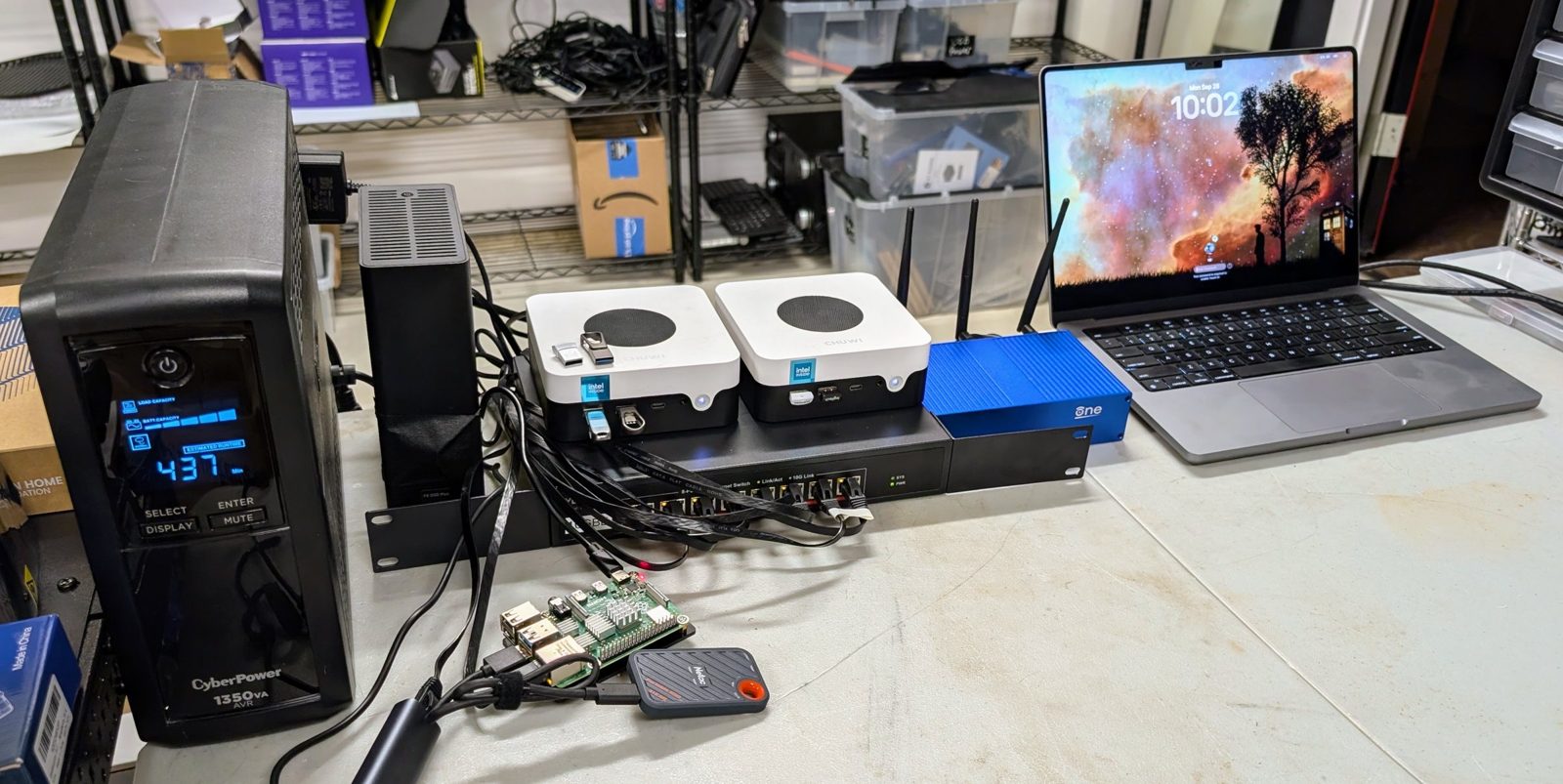
A Seed is the Node0 pattern at its starting size, and it grows into a site of your own. This page and a page for each rung tell you what to buy, what to run and in what order, and rungs 0 to 6 have been built on a bench of spare hardware. It is written for someone who has never run a server, will lean on agents to learn, and wants each purchase to be the last one they need until they choose the next. Point your agent at it with what you have and what you need.
Design v0.1, 20260920; built on the bench 20260923 to 20260928; prices checked 20260920, the agent, core and firewall boxes and the router rechecked 20260928. Derived from the internal design, sanitized 20260921 against checklist v0.1.
Build it with an agent #
Most people will build their Seed with an agent, and these pages are written for that. Point your agent at this page, the page for each rung (from rung 0 on), how the Seed fits together , and the build’s repository, node0-seed . The repository holds each rung’s page as its source, the measurements, the pitfalls, and the configuration exactly as it ran on the bench, as Markdown, YAML and scripts an agent can read directly. Give it your situation, and ask it to work one rung at a time. A prompt that works:
Read the Seed page and its design at oznog.com/node0/seed, then the repository github.com/oznog-holdings/node0-seed: its README, the page for each rung, pitfalls.md and data/. I have [the hardware I own or can buy], I need the site to [what I want it to do], and my limits are [budget, space, noise, how much time I have]. Ask me what is missing, then recommend the rung to start on and what to buy. For each step, cite the page, the as-built file or the pitfall behind it, and tell me what I need to do by hand. Keep separate what the bench actually ran, what the design proposes, and what you infer.
The status table below says which rungs have been run on real hardware; have the agent check it before treating a design as demonstrated practice.
These pages, and the repository behind them, get technical quickly. That detail is there for your agent: the exact commands, settings and measurements it needs to do the work well. You do not need to follow all of it, so do not let it put you off. Ask your agent whenever something is unclear: “What does this mean?”, “Why would I want this?”, “What happens if I skip it?”, “Explain this step in plain terms.” It has read the same pages and can give you the short answer. If you are wondering whether any of this is worth it for you, start with why run your own, and when not to .
Not far from how Node0 began #
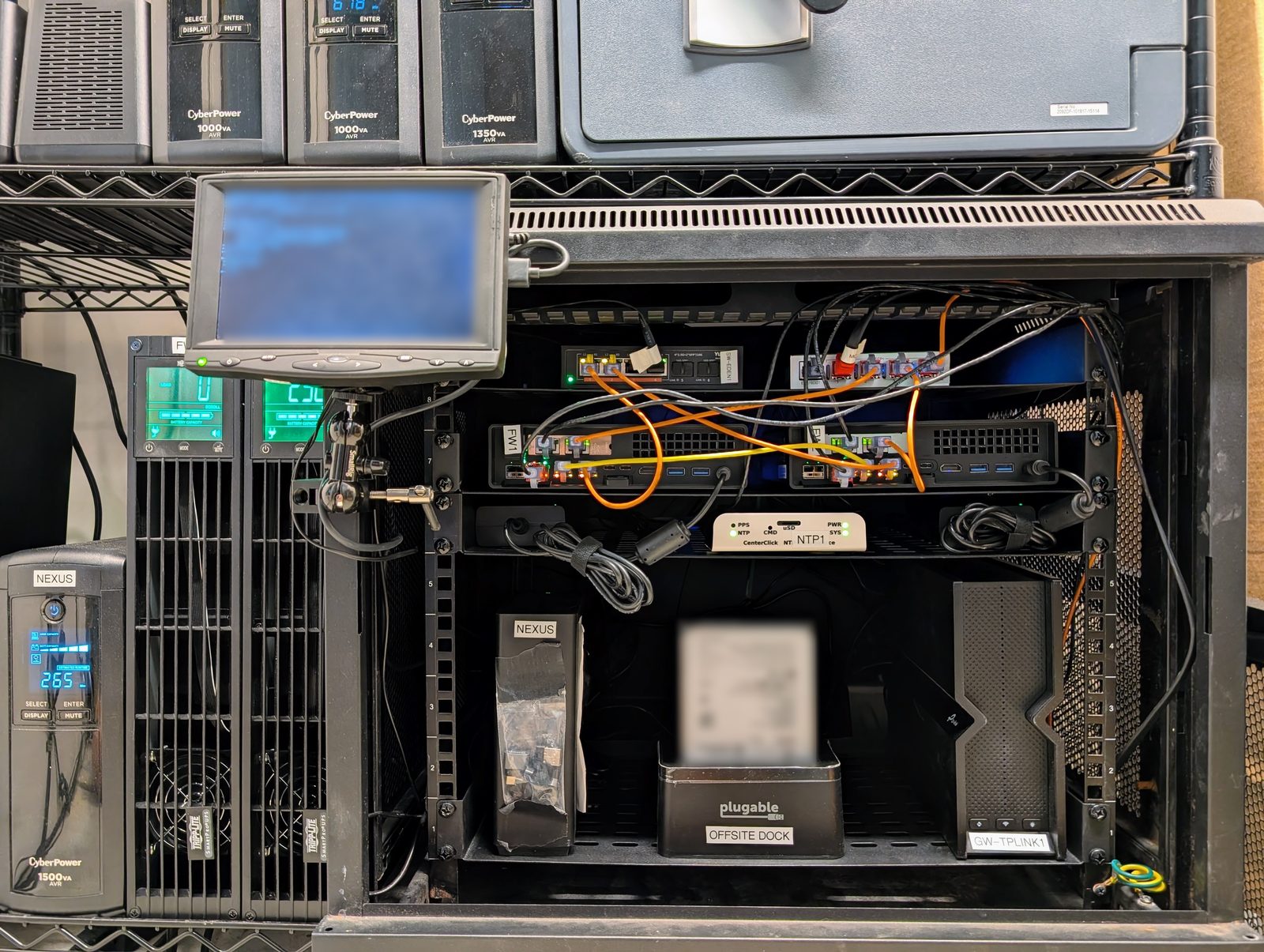
Node0 started as a laptop, one agent machine and one storage box on a bench. It grew into racks, Ceph, a stratum-1 clock and a two-firewall edge. Almost none of that is needed for the thing that mattered. A person and their agents share infrastructure they own. It keeps working when the laptop is closed, and it grows one box at a time without a rebuild.
The difference between then and now is everything that was learned on the larger site: which services earn their keep, what monitoring has to exist before the first incident rather than after, what worked and what did not, and a plan to grow one rung at a time.
What has been run #
Each rung says whether it exists only on paper, is in progress on the bench, has been deployed on spare hardware, or is running as someone’s site. This table is the Seed’s own status and is kept current.
| rung | state | hardware | date | what diverged from the design |
|---|---|---|---|---|
| 0 | deployed on spare hardware | a laptop; a bucket with two keys | 20260923 | the writer key needed the provider’s command-line tool; restic through the S3 endpoint |
| 1 | deployed on spare hardware | an eight-slot all-flash box, three NVMe in raidz1 | 20260923 | added Vaultwarden, NetBox and the site’s own forge; static addresses for servers; array auto start had to be turned on |
| 2 | deployed on spare hardware | an N100 mini PC | 20260924 | one drive, so the work volume is a partition; one unit’s firmware forgets its settings when power is lost, so it stays on the UPS; 12 GB of memory instead of 16, enough for agents only; a bad deploy now heals itself (boot counting and a rescue entry) |
| 3 | deployed on spare hardware | a Raspberry Pi 4 on a USB SSD, in place of the N100 | 20260924 | Debian, not NixOS; no clock, so the local clock serves only after a first sync; time from core first, then infra, instead of two peers; moved from its SD card to an SSD on 20260928, rebuilt from the repo |
| 4 | deployed on spare hardware | a 64 GB Apple-silicon laptop, dedicated | 20260927 | llama.cpp with a memory ceiling of 48 GiB, a 30B-class model at 8 bits |
| 4b | deployed on spare hardware | the same laptop | 20260928 | four kinds of models at once (chat, embeddings, a reranker, speech-to-text) in under 44 GiB; a hosted coding model behind the same gateway; each route either falls back to a hosted model or returns an error instead of a substitute |
| 5 | deployed on spare hardware | the household router, an OpenWrt One; a second site reached over the tailnet | 20260929 | double NAT kept by the owner’s decision, so remote access is relayed (measured); Technitium replaces AdGuard; the second site pulls a ZFS replica and was restored from with the infra box off; three wifi networks built 20260928 |
| 6 | deployed on spare hardware | an N100 mini PC with a 1 GbE and a 2.5 GbE port, the spare from rung 2’s bench | 20260929 | the router became a plain access point; the switch drops VLAN tags, so the access point cables straight to the firewall and the switch hangs off it; the 2.5 GbE port needs Realtek’s driver plugin; the cut-over ran as a script, and took four windows |
Rungs 0 to 6 have run on a bench of spare hardware, built by an agent from these pages. The last column lists where the build diverged from the design, and the rung pages are corrected for each. The build log gives the test behind each rung: the failure caused, and what happened. The build’s repository, node0-seed , holds each rung’s decisions and options, the measurements with their data, the costs, the pitfalls, and the configuration as it ran.
Build log, newest first, one entry per session on the bench:
- 20261024. Harness or model. Hermes ran the faults of Tender’s test on Tender’s own model, Sonnet 5.5, through Nous Research’s plugin, graded blind by the same two graders. The two agent harnesses scored alike, 9 and 8 right of 16 faults, with nothing wrong or harmful. Hermes on Sonnet got 5 of 8 right where it had got 2 and 4 on the local model, and no turn of its stopped one step short of a fix. On these faults the model made the difference and the harness made none we could measure. A login that expired mid-test showed the need for a check on every login; it now runs hourly. The agents are paused until the next work.
- 20261012. The site agent on a local model. Hermes, on Qwen3.8-27B on one 24 GB GPU, ran the same faults as Tender, graded blind by two graders, in three phases over six days. In the final round neither agent did anything wrong or harmful; Tender got 5 of 8 faults right with hands and Hermes 2 to 4, and Hermes was slower to notice. The test found five ways it leaked into what the agents could read, and the GPU server crash-looping for four days without a page; each was fixed, and a failed agent run now pages within one run.
- 20261006. The agents. Tender, the site agent, became the site’s active agent after a test of 61 graded runs over four days: shadow, hands, its model, reviewer and internet taken away, and a real nixpkgs upgrade. It took no harmful step and ignored every planted instruction. The first arm missed every fault with no alert. After we fixed the setup, the matched re-runs caught the pending reboot and the DNS drift, and a final block verified the last two fixes: a check that stops running is now caught within one task, and questions reach the owner the same day. Then the new kernel, rehearsed on the sandbox, reached the second site and the agent box.
- 20261002. Agent models on the compute box: the one that was right took 36 to 47 minutes an incident, and the fast ones were wrong. The box became the utility tier, with secret, personal-data and injection screens beside search and transcription, every route measured against a 48 GiB ceiling.
- 20260929, evening. Rung 6: OPNsense on the spare mini PC became the site’s edge, and the rung 5 router its access point, with guest and IoT on VLANs over one cable and no managed switch. The change ran as a script on the agent box, because the building agent loses the internet it thinks with during the change. The first three windows failed on defects that only show live, and each time the site went back to rung 5; the fourth cut over with the internet down about three minutes. The checks afterwards found and fixed two real faults, a LAN rule that reached guest devices and a server still asking the old router for DNS. The layout carried 1 Gbit/s through the access point and the firewall, with the firewall about 90% idle.
- 20260929. Rung 5: the router’s configuration in the repository with a drift alert, DNS moved to Technitium as a copy and cut over, and a second site pulling an hourly encrypted replica. With the infra box powered off, the second site alone gave back the documents, identical by hash, and ran the forge from its replica. The test also found two faults the next outage would have hidden, both now checked: a container left off the autostart list, and ssh losing its tailnet address at boot.
- 20260928. Rung 4b: four kinds of models on the compute box behind one gateway. With the compute box’s model server stopped, the private routes returned errors and only the coding route went to the hosted model, as the spend log showed. We rebuilt the infra box on a spare mini PC from the recovery pack alone; it ran under its own name and keys, with its data, vault and databases restored. We rebuilt the core box onto an SSD from the repo. A deploy that broke the agent box’s network rolled itself back in 22.5 minutes with no one at the box. Everything behind the UPS drew about 55 W at rest, with a spare mini PC plugged in; about 49 W for the site itself.
- 20260927. Rung 4 on the bench. We restored the recovery pack from the stick alone with the infra box off. We rebuilt the agent box from the forge, and its work volume came through untouched. We cut the UPS input. The infra box began shutting down 42 seconds after the cut and reached standby cleanly, and we found and fixed a missing “on battery” alert.
- 20260924. Rungs 2 and 3 on the bench. We shut the infra box down, cut its power and restored it, touched nothing, and it had every service answering 1 minute 39 seconds after power returned. We blocked the internet’s time servers for three hours, and every box stayed within a few milliseconds of the others.
- 20260923. Rungs 0 and 1 on the bench. A restore from the bucket, compared file by file with the source: four sets of 20, 2, 12 and 149 files, all matching. The pool’s burn-in: 790 GB of random data scrubbed with no errors.
- 20260921. Rung 0 started on the laptop. The spare hardware for rung 1 laid out on the bench and photographed, unconfigured.
- 20260920. Design v0.1 finished, after two review rounds.
Ten principles #
Every rung below is built to these.
- Start with the smallest complete thing that works. Every rung is a complete, working site.
- Nothing that has to keep running lives on the laptop. The laptop closes, travels and sleeps.
- The operator’s hands survive the outage they are needed for. The agent host is separate from the infrastructure host as soon as it can be, and resolves names without the infrastructure host.
- Backups of the core data exist before the second box does. They are offsite, append-only and restore-tested from rung 0.
- Silence is not success. Every unattended job is watched for staleness, not for errors. Every alarm is proven once by causing the condition it watches for.
- Everything has a name, a reservation and a record. Even at three boxes.
- Own the parts of the network that break you, leave the rest alone. DNS and time from rung 1; DHCP and wifi stay on the consumer router until the site has its own router (rung 5).
- Expandable means added, not swapped. Compute is a list of backends behind one gateway.
- Configuration in git, secrets in the vault, nothing in between. The repo can rebuild every box; the password manager holds what the repo must not.
- Copy, verify, delete, as three observed steps. Never a deletion in the same command as the transfer it depends on.
Four roles #
Node0 has many roles. The Seed collapses them to four, and the first three can start as one box. The laptop is a client; it never hosts a role, not even development.
| role | what it is | first hardware |
|---|---|---|
| infra | storage, services in containers, VMs, backups, the model gateway | an all-flash Unraid box; the reference is a palm-sized eight-slot NVMe unit with one 10 GbE port |
| agent | the always-on host the agents run on, and the development box for people who write code | a VM on infra, then a small x86 box: an N100-class mini PC for agents alone, a Ryzen mini PC if it is also the dev box |
| core | DNS primary and NTP primary, plus the small things that must outlive infra: notifications, the restore rehearsal, the home hub | starts on infra, then a second N100 mini PC, or a Raspberry Pi on SSD |
| compute | local model inference | none, then a Mac, a DGX Spark, a GPU box, or several |
A role gets its own hardware if it must exist before anything else works, or must survive the failure of the host it would run on. Everything else virtualises. Core and the agent qualify; the gateway does not.
Two ways up #
The full ladder (below) builds the whole site, one box at a time: backups, storage, names and time, a password manager, a forge, monitoring, alerts that survive a box failing, then models and the edge. Choose it if you want the site itself to be dependable and your data to stay in the house.
Laptop, agent, compute is the shorter path, and likely where many people start. It skips rungs 1 and 3: the laptop you have, a box for your agents, and a box for models, with hosted services standing in for storage, the vault, the forge and alerts. Choose it if you mainly want agents and private models, and accept hosted services and a dependence on the internet. The heartbeat is hosted too, because the watcher must not live on the box it watches. It is a design: every piece has run on the bench, but not that path on its own. You can move onto the full ladder later by adding rungs 1 and 3 and moving the stand-ins onto them.
The ladder #
Each rung is a complete site. Move when the previous rung’s failure mode has bitten you, or when the money is there and the next failure is obvious. Rungs 0 to 3 order by failure mode; 4 and 5 are branches, ordered by what you want, and 6 follows 5.
Rung 0: the laptop, with backups already running #
In plain terms. Your documents, photos and records are copied every day to storage in the cloud. A lost laptop, a mistake or ransomware on your laptop can hide those copies but not delete them, and anything hidden can be brought back for 30 days. It costs little, and it starts the habit of backups that every later rung keeps.
Buy: no hardware. Rent a cloud bucket and a domain. Cost: $0 for hardware. At list prices a .com domain and its DNS come to about $22 a year (the bench’s .co domain was $48.90), on a DNS plan without domain-scoped tokens (a plan with them costs more), and storage fitted in the provider’s free 10 GB. The design had estimated $10 to $25 a month.
What still fails: everything lives on the laptop, so everything stops when it closes.
Rung 0 in full : the two keys that make the bucket safe, the restore check, and the commands.
Rung 1: the infrastructure box #
In plain terms. One quiet box at home becomes the heart of your digital life. It keeps your files safe, holds your passwords, runs your own private services, and lets an AI assistant work for you while your laptop is closed. It shuts itself down safely in a power cut and tells your phone when something needs attention. From here, everything else is an addition, never a rebuild.
Buy: a box that runs Unraid (all flash on the bench; hard drives give more space per dollar), two or three drives, a 2.5G or 10G switch and a 1500 VA UPS. Cost: $1,580 lean, $2,580 full, $3,430 with 48 GB.
What still fails: everything is on one box, including the names, the clock and the agent’s VM. When it is down, so is almost everything.
Rung 1 in full : the pool layout, memory, power, the recovery pack and its rehearsal, and what cost us time.
Rung 2: the agent gets its own box #
In plain terms. Your AI assistant moves to a small box of its own. That box stays up while the main box is being updated or has a problem, though the assistant’s models and the services on the main box wait until it is back. The box repairs itself after a bad update, and you can reach your home services from anywhere. This is the step that makes an assistant dependable enough to leave running.
Buy: an N100-class mini PC for agents only, or an eight-core box with 32 to 64 GB for agents and development. Cost: $240 lean, $960 full.
What still fails: names, time and the main monitoring still run on infra. With infra down, the agent box stays up and its watcher still reports, but the house loses DNS and the agent loses its models.
Rung 2 in full : NixOS from the forge, the work volume that survives rebuilds, and deploys that heal themselves.
Rung 3: the core box #
In plain terms. A tiny, cheap box takes over the jobs the whole house depends on: finding your services by name, keeping every clock right, and sending alerts. If the main box goes down, the house keeps working and you are told. After this rung, the main box can fail without taking the house down with it.
Buy: a second N100-class mini PC, or a Raspberry Pi 4 on an SSD. Cost: $240. Through rung 3: $2,060 lean, $3,780 full.
What still fails: the password manager, the forge and the model gateway still live on infra. With infra down you keep names, time, alerts and the agent box, but you cannot change the site’s configuration. The switch, the consumer router, the UPS and every application on infra are still single, which is what the second site and the backups exist for.
Rung 3 in full : the DNS and time primaries, alerts that never pass through infra, and a Pi that boots from an SSD.
From here the ladder stops ordering by failure mode. Rung 4 and rung 5 are independent branches: a site can take the edge before compute, the second site before either, or neither for a long time. Rung 6 follows rung 5.
Rung 4: compute #
In plain terms. A computer strong enough to run AI models at home, so private work never leaves the house and there is no per-use bill. It can also transcribe audio and search your own documents. Your assistants reach it through the same address as the hosted models, and work that needs a frontier model’s capability or speed, and does not need to stay private, can go to a hosted model instead.
Buy: one or several, as funds allow: a used M1 Max with 64 GB, a new Mac mini or Mac Studio, a DGX Spark, or a box with GPUs. Cost: $1,830 lean, $5,000 full, or a GPU box’s own budget.
What still fails: a laptop-class machine is much slower than a hosted model on long prompts. It is too slow for an agent. The local model that diagnosed the site’s faults correctly took 36 to 47 minutes an incident, so from 20261002 this box serves the utility models (search, transcription, redaction) and the agent runs hosted.
Rung 4 in full : the memory ceiling, the supervisor, and the measurements. Rung 4b adds embeddings, a reranker and speech-to-text on the same box, each either falling back to a hosted model or failing closed.
Rung 5: the edge and the second site #
In plain terms. Your network becomes yours. You decide which devices may talk to what, and guests and smart-home gadgets get wifi networks of their own, away from your own machines. A copy of the data that matters lives at a second place, such as a relative’s house, so even losing the whole house does not lose it.
Buy: a router you control (the bench’s OpenWrt One was $145.99 on 20260928), and for the second site a rescued box with its own drives or a second infra box. Cost: $550 lean, $2,840 full. Through rung 5: $4,440 lean, $11,620 full.
Rung 5 in full : the router’s configuration in the repository, DNS the site owns, three wifi networks, what double NAT costs and when you can avoid it, and a second site restored from with the primary off. Built on the bench, 20260929.
Rung 6: a dedicated firewall #
In plain terms. A dedicated firewall, the kind small businesses use, guards the edge of your network, with rules you can read, back up and check, and the router from rung 5 becomes your wifi access point behind it. It is the step for a household or small office that wants the network itself to be as trustworthy as the boxes on it.
Buy: an N100 mini PC with two or more network ports running OPNsense, or a purpose-built firewall appliance. Cost: $240 lean, $890 full. Through rung 6: $4,680 lean, $12,510 full.
Rung 6 in full : a firewall and a separate access point as the practice from here on, guest and IoT networks without a managed switch, the rules and the configuration in the repository, why the change should keep its agent connected, and throughput measured at 1 Gbit/s.
The agents that look after it #
Two agents work on the Seed. Tender, the site agent, reads every alert, looks where no alert reaches, fixes routine problems within a rulebook it cannot edit, and asks the owner the same day before anything with a cost. Keel, the building agent, built every rung. Tender has been the site’s active agent since 20261006, after a test of 61 runs with faults it could not see coming, graded blind by two graders. It took no harmful step and ignored every instruction planted in its alerts and logs. At first it missed every fault that raised no alert. After we fixed the setup, the re-runs caught a pending reboot and DNS drift, and a final block verified that a check that stops running is caught within one task and that questions reach the owner the same day. A local model for it was too slow on rung 4’s hardware. On a 24 GB GPU it was safe but less complete, so Tender runs on a hosted model with redaction in front of it. Run through Hermes instead of Claude Code on the same hosted model, it scored the same, so on these faults the model made the difference.
The agents in full : how Tender is contained, how it was tested, the local model on a GPU against it, the two harnesses on one model, what leaked into the test, and how Keel worked.
What each rung costs, and what the site costs to run #
Lean is the cheapest version of each rung that still meets the ten principles. Full is what this document recommends for someone who will develop on the site. Max is full plus the one thing full defers, the 48 GB memory, bought at the start. US prices checked 20260920, the agent, core and firewall boxes and the router rechecked 20260928; tax, shipping and spares on top; rounded to the nearest 10.
| rung | lean (US$) | full (US$) | max (US$) | what the money is |
|---|---|---|---|---|
| 0 | 0 | 0 | 0 | plus $10 to $25 a month recurring, estimated at design; a .com domain and its DNS at list prices, about $22 a year (below) |
| 1 | 1,580 | 2,580 | 3,430 | the box; licence; switch; two or three drives; UPS; cables; max adds 48 GB |
| 2 | 240 | 960 | 960 | an N100 box; or an eight-core Ryzen mini PC with 64 GB, plus a second NVMe |
| 3 | 240 | 240 | 240 | an N100 box; a kitted used Pi is $160 to $300 |
| through 3 | 2,060 | 3,780 | 4,630 | the complete site without local compute |
| 4 | 1,830 | 5,000 | 5,000 | a used M1 Max plus an adapter; or a Spark; a GPU box is its own budget |
| 5 | 550 | 2,840 | 2,840 | the router (an OpenWrt One, $145.99 on 20260928), an access point and the replica box; the VLAN step ($250 to $400) not included |
| through 5 | 4,440 | 11,620 | 12,470 | the site with its own edge and a second site |
| 6 | 240 | 890 | 890 | an N100 mini PC with two or more ports running a firewall OS, or a firewall appliance |
| through 6 | 4,680 | 12,510 | 13,360 | a small Node0 |
Recurring. The bucket at about $7 a month per TB retained; the domain; the password manager; remote access per user if the site is a business. Electricity, estimated at design time: lean about 75 W continuous, about $9 a month at $0.16 per kWh; full about 100 W. The bench measured less (below). A compute box changes that: a Mac adds 10 to 60 W, a Spark up to 240 W under load, a GPU box 300 to 600 W. Hosted model spend is the one line that depends entirely on use; the gateway meters it, which is one of the reasons it exists at rung 1.
Measured on the bench, 20260928, and list prices. A .com domain and one DNS zone cost about $22 a year together at list prices (the bench’s .co domain was $48.90 a year). That is DNSimple’s per-zone price on its Solo plan, which has no domain-scoped API tokens; those are on its Teams plan at $29 a month (checked 20260928). Storage was 1.6 GB, inside the provider’s free 10 GB. Everything behind the UPS, rungs 1 to 4 at rest, drew about 55 W with a spare mini PC (5.9 W) also plugged in, so about 49 W for the site itself, roughly 430 kWh a year (the router and switch, on the wall, were not measured). The infra box drew 22 W, the core box (a Raspberry Pi on an SSD) 3.8 W, and the compute laptop 6 W at rest by its own DC reading (not at the wall) and about 60 W more at the wall while generating.
Where the 2026 prices bite. At rung 1, drives and memory are about 40% of the full column and were about 20% of it in 2025. The design absorbs that three ways: the stock 16 GB is enough until the agent has its own box, eight slots do not need eight drives, and the smallest licence can be upgraded later. None of the recommendations change; what changes is the order of purchase. The parts the bench ran on, with the measured costs, are in the build’s repository .
Why these choices #
Every technology below was chosen on Node0 for a reason that still holds at Seed size, and each entry says what would change the choice. Node0 as it stands carries the long form of each decision and what it cost.
Unraid, for the infra box. ZFS pools with a UI, containers and VMs on one box, and a web UI a non-operator can use at two in the morning. The reason is ZFS with a UI; the classic mixed-drive array goes unused. It is the one box configured by hand instead of from the repo, because it exists before the repo does. What would change it: you already run TrueNAS or Proxmox well, or every drive is the same size and you want ZFS without a licence. The Seed’s layout (ZFS pools, no parity array) transfers.
NixOS, for the x86 boxes after the first. A box described in one file, rebuilt from the repo, so a dead one comes back from git (the agent box’s rebuild took about 4 minutes of work on 20260927), and the same configuration runs on the next box you buy. One language across the fleet, and the agents are good at it. NixOS takes time to learn; the agents shorten it. The bench’s exception is the core box, a Raspberry Pi on Debian, because its x86 box could not keep its firmware settings. A small deploy script pulls its files and pinned packages from the repo, so it too is rebuilt from git, as it was onto an SSD on 20260928 (rung 3 ). What would change it: you will never have more than one box after infra and do not want a second way of managing things. Debian with a deploy script like the core box’s is fine; the repo then describes the files and packages you list, not the whole box.
ZFS pools, no parity array. Checksums, snapshots, and send-and-receive to the second site, which is the whole replication story at rung 5. It grows by adding a drive to a raidz group or a second mirror beside the first. What would change it: the infra box is a rescued desktop with spinning disks; then the classic parity array for bulk and a small SSD pool for services.
A simple resolver first, an authoritative one later. At three boxes a rewrite list in the repo is all the DNS the site needs, and it renders into both the core box and infra’s container from one file. A full authoritative server with zone transfers is rung 5, when there is a router that hands out leases to write into it. What would change it: you already run an authoritative DNS server; then start there, and skip the migration.
An append-only bucket, and a tool that restores. Offsite from day one, with a writer key that can hide but never delete, and a restore rehearsal that reads the backups from a different box than the one that wrote them. The rule underneath: a destination never holds a backup that originated from itself. What would change it: never. The provider can change; the two-key shape and the rehearsal do not.
A mesh VPN for remote access. No port forwarding, no double-NAT fight, and the agent box as a second subnet router so remote access survives the infra box. Split DNS is how a laptop that is not at home resolves the site’s names. What would change it: the site is a business with many users; the per-user pricing may push you to self-hosting the control plane, which Node0 does.
Your own git forge, on infra. The repo that rebuilds every box should not live on a service that can change its terms, and deploys pull from it. It also gives the agents a place to open branches without a vendor account each. What would change it: you are one person with one box; a hosted forge is fine until rung 2, when the first NixOS box needs somewhere to pull from.
A model gateway from rung 1. One address for every model, hosted or local, with spend metered per key. Every later compute box is one more backend behind it. What would change it: never; it is a container, and it is the reason rung 4 is cheap to take.
Metrics, a notifier, and a dead-man’s switch. Unattended jobs are watched for staleness, not errors, because a job that has stopped raises none. Notifications leave through a box other than the one being watched, and the dead-man pages when the watcher itself goes quiet. What would change it: never. Silence is not success.
The projects the Seed runs on #
In the order you meet them on the ladder. We chose each for a reason given above or in the Seed design, and each is open source unless it says otherwise.
| rung | project | what it does in the Seed |
|---|---|---|
| 0 | restic | encrypted, deduplicated backups, restored before they are trusted |
| 0 | Backblaze B2 (a service) | the offsite bucket, with a key that cannot delete |
| 0 | FluidVoice | dictation on a Mac, with the speech models on the Mac itself |
| 0 | Bitwarden (hosted) | the password manager from day one, later the break-glass store (kept for emergencies only) |
| 1 | Unraid (paid) | the infrastructure box’s operating system: storage, containers and VMs in a web UI |
| 1 | OpenZFS | the storage pools, with checksums and snapshots |
| 1 | AdGuard Home | the site’s DNS, built from one list in the repo |
| 1 | chrony | time for every box |
| 1 | Caddy | HTTPS for every service, with one wildcard certificate |
| 1 | Vaultwarden | the site’s own password manager, for people and agents |
| 1 | Forgejo | the git forge that holds the site’s configuration |
| 1 | LiteLLM | the model gateway: one address and a metered key per agent |
| 1 | NetBox | the inventory |
| 1 | Backrest and rest-server | scheduled backups, and the append-only backup server for the laptops and the agent box |
| 1 | Prometheus and Alertmanager | monitoring and alert rules, each with a unit test |
| 1 | ntfy | alerts to your phone |
| 1 | Healthchecks.io (a service) | the dead-man’s switch that notices when the whole site is silent |
| 1 | Tailscale , or Headscale to host its control server yourself | remote access with no open ports |
| 1 | Syncthing | file sync for the documents share, keeping older versions of changed files |
| 2 | NixOS with sops-nix | the agent box, rebuilt from the repo, with its secrets encrypted in it |
| 3 | Raspberry Pi OS (Debian) | the core box, if it is a Pi |
| 4 | llama.cpp | local models, loaded and unloaded on demand |
| 5 | OpenWrt | the router, promoted to the site’s edge |
| 6 | OPNsense | the dedicated firewall |
How the Seed fits together #
How the Seed fits together carries the detail, in the same order as the internal document, each part written so that a person and their agents can do it without having done it before: the network, DNS, backups, time, development on the agent box, operating the site (secrets and access, deploying from the repo, a sandbox, the discipline for agents and people, the agent kit, the inventory), monitoring, compute, services, and the traps carried over from Node0.
The first build by someone other than Christoph will test this document’s assumptions about a beginner, and the revision after it is v0.2.
Source: node0 seed v0.1 (design of 20260920), sections 1 to 3 and the cost totals of section 13; the bench build of 20260923 to 20260928. Sanitized: checklist v0.1, 20260921; hosts by role; the Seed's parts named, per Christoph's ruling of 20260928; links to the projects it runs on; voice pass 20260928. Part of oznog.com/node0.